Occupational risk platformPilot open

Risk assessment that does not end with a document.

RiskSensei is risk assessment software that brings work processes, hazards, initial and residual risk, preventive measures and Sensei AI into one continuously managed system.

Pilot access is granted after an individual review of the application.

Risk matrixSENSEI AI
INITIALbefore measures
Likelihood (L) →
Consequence (C) →
Average reduction−0%
Risk score · 1 → 25
8
step assessment flow – from the work process to the action plan
3
risk levels for every hazard – initial, actual and forecast, so the effect of each measure is visible
EU
data and Sensei AI processing in the European Union
25 yrs
of occupational health and safety practice, out of which RiskSensei grew
Why RiskSensei

If risk assessment ends with a document, risk management has not started yet.

An assessment has to say not only “what the risk is”, but also “what is being done about it” – and how that changes the risk level over time.

01Assessment becomes a continuous process.Not a document once every few years, but a living risk register that changes together with the processes.
02The impact of prevention becomes visible.Initial and residual risk are assessed separately, so you can see what each measure actually delivers.
03Every decision has grounds.Real accidents recorded in Lithuania are attached to the hazards, and every measure has an owner, a deadline and a status.
How risk behaves over two years
RiskSensei management cycle · risk band: 16–2510–155–91–4one-off assessment
16
12
8
4
16
12
8
6
4
Assessment+6 mo.+12 mo.+18 mo.+24 mo.

Illustration · risk scores from example assessments, not measured results.

One-off assessmentThe document is prepared and put on a shelf. The risk level stays as written down – even after the process has changed.
RiskSensei management cycleEvery implemented measure recalculates residual risk, and a repeat assessment shows the actual change.
How it works

Occupational risk assessment in three steps

1
Assessment scope
Warehouse loading process
Activity: pallet handling with a forklift
CollisionFalling load
Activity: order picking for dispatch
Manual lifting

Define

Work processes, activities, equipment and company-wide hazards form the basis of the assessment.

2
Initial → residual risk
16Initial
6Residual
Sensei AI suggests hazards, scenarios and measures

Assess

Identify hazards, describe possible event scenarios, set the initial risk and evaluate the existing preventive measures. Sensei AI helps wherever it can shorten the specialist’s work.

3
Action plan
Interlocking guardJ. Kazlauskas · 2026-10-15IMPLEMENTED
LOTO procedureR. Petrauskienė · 2026-11-02PARTIAL
Control checkA. Navickas · 2026-11-20PLANNED
Target risk once measures are implemented 4

Manage

See residual risk, plan additional measures, assign owners and deadlines, and track implementation and changes in risk.

Sensei AI

Sensei AI helps you see. The specialist decides.

Hazard suggestions based on the work process, event scenarios, preventive measures and photo analysis. The specialist reviews and refines every suggestion – only what they confirm goes into the assessment.

Workplace photo or a Sensei AI screen
Capabilities

What you can manage with RiskSensei: from the risk register to the action plan

Six core groups an OHS specialist works with every day – not the whole platform.

Assessment

Assess not only risk, but the impact of prevention.

Initial and residual risk are assessed separately, so it is clear how applied and planned preventive measures change the risk level.

Event scenarios

A hazard is described by a scenario, not a single line.

Every hazard is assessed through a possible event scenario: what can happen, what the initial risk is, and how the applied preventive measures change it. Sensei AI proposes the scenario, the specialist refines it.

Production operator · Pressing process
Hand entering the press zone while clearing jammed material
16Initial6Residualresidual risk – within the acceptable zone
Interlocking guardLOTO for clearing jamsControl check and an assigned owner
Photo analysis

Sensei AI marks risks on a workplace photo.

Upload a workplace photo – Sensei AI marks risks, notes, existing preventive measures and good practice directly on the image. Every mark carries a description and becomes part of the assessment.
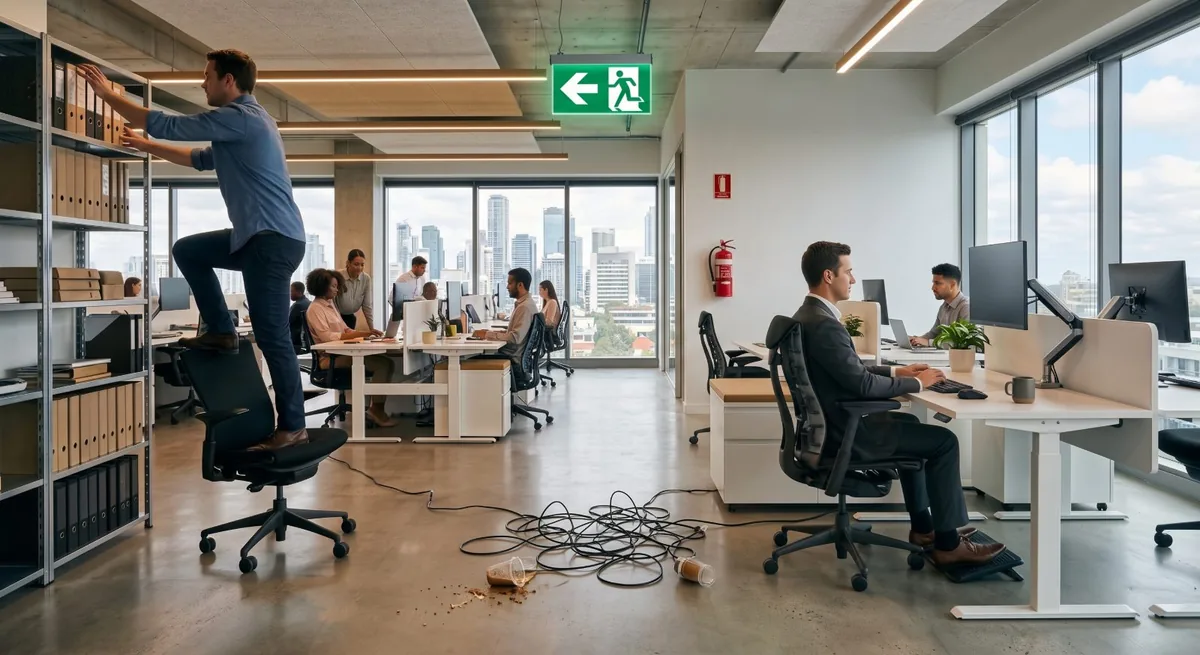
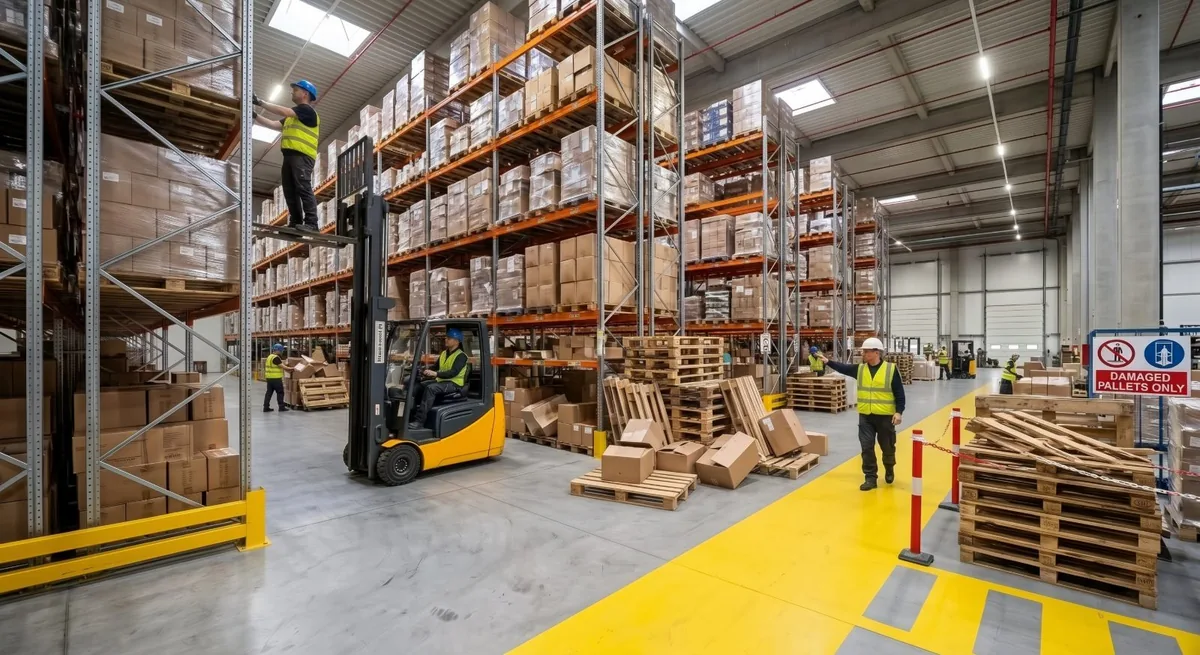
  • Automatic detection of hazards and measures in a photo
  • Four kinds of marks: risks, notes, good practice, prevention
Office workplace photo with Sensei AI marks
1
2
3
Looking for possible hazards and details…
5marks in the image
Sensei AI
RisksNotesGood practicePrevention
Reports

An occupational risk assessment report where risk is grounded in real accidents.

In the photo annex, Sensei AI marks risks, notes, existing preventive measures and good practice directly on the image. Each hazard is linked to real accidents in Lithuania from the State Labour Inspectorate database (since 2011), so the risk level rests on facts rather than opinion.

  • Marks on the image: risks, notes, measures, good practice
  • Related inspectorate accidents with date, severity and description
  • The risk level scale and the applicable technical requirements
Actions

From occupational risk assessment to concrete action.

Link every additional preventive measure to an owner, a deadline and a status. See the risk level you are aiming for once the planned measures are in place.

Risk Landscape

See the overall risk picture of the organisation.

Risk Landscape shows the highest risks, recurring hazards and how they are distributed across the organisation’s processes.

Also in the platformsix features that work together with risk assessment
Site assessment

Photo annotation by plant, unit or shop floor – independent of job-role assessments.

Action plan management

All measures in one queue: owners, deadlines, overdue actions and the completion rate.

Non-conformities with before/after

Every non-conformity with photos before and after the measure – evidence that it really was implemented.

Accident database browser

Accident statistics since 2011, filterable by hazard category and severity.

Hazard reporting

Any employee can report a hazard with a photo – the report is carried into the current risk assessment for that job role.

Notifications

Automatic emails and reminders: a new task, an approaching deadline, an overdue measure – with editable templates.

Product FAQ

What is worth knowing about the platform?

How does RiskSensei help with day-to-day risk management?
RiskSensei links work processes, hazards, risk assessment and preventive measures in one system. You can track implementation, update the assessment and, when needed, produce documents from the data managed in the system.
What does Sensei AI do, and what does the OHS specialist decide?
Sensei AI helps spot possible hazards, suggests event scenarios and preventive measures, and helps review workplace photos. Suggestions follow rules written by SAUGA PRO OHS experts. The specialist reviews, refines and approves them – the final assessment remains their responsibility.
How is current risk separated from the effect of planned measures?
Risk is assessed on a 1–25 scale: likelihood × consequence. Initial risk is set without regard to preventive measures; residual risk reflects their implementation status. The effect of planned and postponed measures is shown separately as a forecast, so it is clear which risk level applies now and which is still only a target.
What do the preventive measure statuses mean?
The status shows whether a measure is already in force and how it enters the risk assessment and the action plan, including deadlines and/or owners:
  • Implemented – in force, its effect is included in residual risk.
  • Partial – the effect is counted in part; what is missing and the plan for full implementation are stated.
  • Planned – the effect is shown only in the forecast; the measure goes into the action plan.
  • Postponed – the effect is shown only in the forecast; the reason for postponement and a review date are stated.
  • Not set – no status assigned, the measure is not counted.
Planned and postponed measures do not reduce current residual risk – the forecast shows the effect they would have if implemented.
What does STOP mean and how are preventive measures chosen?
RiskSensei follows the STOP hierarchy of preventive measures:
  • S (Substitution) – eliminating the hazard or replacing it with something less hazardous.
  • T (Technical) – guards, interlocks, ventilation.
  • O (Organisational) – training, procedures, work organisation.
  • P (Personal) – personal protective equipment (PPE).
Measures are considered in this order, giving priority to eliminating the hazard or replacing it with something less hazardous. You will see immediately if prevention rests on PPE alone.
How is the residual risk decision justified (ALARP)?
RiskSensei applies the ALARP principle – reduce risk as low as reasonably practicable. The system highlights risks that need additional measures or a documented justification by the owner: it checks whether residual risk exceeds the acceptable risk threshold set by the company and takes the severity of consequences into account. The justification is tied to a specific assessment; if its conditions change materially, it has to be reviewed.
Does RiskSensei meet occupational risk assessment requirements?
The structure of RiskSensei follows the occupational risk assessment and management process. The adequacy of the final assessment depends on the data provided and on the decisions of a competent specialist.
How does the team take part in implementing preventive measures?
In the action plan, measures are assigned owners and deadlines, and their status is tracked. The OHS specialist manages the assessment, while the people responsible see and update the tasks assigned to them. That is how assessment decisions become concrete team work.
How is our assessment data handled?
Your assessments and documents are stored in a Google Cloud data centre in the European Union (the Netherlands). Access for your organisation’s users is limited according to their assigned roles; authorised technical staff may have the access needed to run the service or resolve faults. Sensei AI processing also takes place in the European Union. When dictating in the RiskSensei platform only the resulting text is kept; we do not store the audio. We do not sell data and do not use it for marketing. We provide the data processing terms before the pilot begins.
Try it live

See the platform in action

A document when you need one.

Risk data stays managed in the system, and you can generate the assessment report from current data whenever it is needed.

Platform vision Direction of development

Risk data as the shared basis for OHS processes.

We are building RiskSensei so that in future the same risk data can drive PPE selection, employee training, OHS instructions, health factors, procedures and other prevention processes.

PPEselected on the basis of risks
Trainingtopics from workplace hazards
OHS instructionscontent from scenarios
Risk
data
Health checksrisk factors for examinations
Procedureswhere risks are highest
Signagezones where risk is highest
Limited RiskSensei pilot

Try RiskSensei on a real process in your company.

We are looking for organisations and OHS specialists who want to try the platform in practice – not on demo data, but by carrying out a real occupational risk assessment.

ApplicationIndividual reviewScope conversationPilot access

Every application is reviewed individually. Pilot access to RiskSensei is granted separately to selected participants.

Submitting an application is not an automatic sign-up.

Apply

Pilot terms

  • 30 daysof pilot access
  • Up to 3 usersfrom your organisation
  • 1–3 real work processesscope agreed individually
  • Sensei AI includedfree of charge for selected participants
Pilot FAQ

What is worth knowing before the pilot?

Who is the pilot for and what is worth trying?
For companies and OHS specialists who want to run a risk assessment on their own work process data. Choose a process you know well and would need to assess soon anyway – that way you can compare working in RiskSensei with your current practice.
Is the pilot paid?
No. For selected participants (companies) the 30-day pilot is free and Sensei AI is included. We agree the scope before the start: up to 3 users and 1–3 real work processes. No paid subscription starts automatically when the pilot ends – continued use is decided separately.
How long does the pilot last and what will it require from us?
The pilot runs for 30 days. You will need to set aside a few hours, choose 1–3 real work processes and involve qualified staff. We agree the scope at the start and discuss the outcome at the end.
What result will we be able to judge during the pilot?
You will be able to run a risk assessment for the chosen process and judge how RiskSensei helps connect hazards, preventive measures and the action plan. Any documents produced during the pilot stay with you.
Will we get access immediately after applying?
No. Every application is reviewed individually. We contact the selected participants, agree the scope of the pilot and grant access. Submitting an application does not create an account.
What happens when the pilot ends?
After 30 days the pilot ends. We discuss the outcome and you assess the value of RiskSensei for your organisation. The documents produced stay with you.